
The Complete Guide to AI Clinical Documentation for UK Dentists (2026)

Not all AI notes systems are created equally.
Some systems transcribe. Some write a generic note. The strongest systems turn one consultation into the complete dental documentation workflow, in your preferred structure, without repeatedly entering the same information.
Dictation
Turns speech into raw text. You still structure the record.
Generic scribe
Creates a medical summary, but may miss dental workflow.
Dental note AI
Understands dental language and produces a clinical note.
Complete workflow
One consultation becomes the note, patient documents and the next steps.
This guide shows how to tell the difference before you commit your clinical workflow to a product.
See the complete workflowAI dental notes can save time, but the phrase now covers products with very different capabilities. Some convert speech into text. Some produce a generic medical summary. Others understand dental language but stop as soon as the note is written.
The real question for a UK dentist is no longer "Can AI write a note?" It is:
Can this system follow my clinical structure, reuse the consultation across every document, support the patient after the appointment and keep me in control of the final record?
That difference matters. A polished note is not automatically an accurate note, and fast transcription is not the same as a complete clinical documentation workflow.
Why AI Notes Systems Are Not All the Same
The easiest mistake is to compare every product as though it does the same job. It does not.
A basic dictation tool saves typing but leaves the clinician to organise everything. A general medical scribe adds structure, but may not understand tooth notation, dental materials or the way dentists discuss consent and treatment. A dental note generator can create a better record, yet may still finish at the note.
The most useful systems support what happens around the note: your templates, treatment selections, patient documents, care plans, educational media, referrals and clinical review.
The Four Levels of AI Clinical Documentation
| Level | What it does | What the dentist still has to do |
|---|---|---|
| 1. Dictation software | Converts speech into raw text | Structure, format and complete the record |
| 2. General AI scribe | Summarises a consultation into a medical-style note | Correct generic wording and add dental detail |
| 3. Dental AI note generator | Understands dental terminology and creates a structured note | Complete the wider patient and documentation workflow |
| 4. Complete dental workflow | Reuses one consultation across notes, patient documents, templates and next steps | Review, approve and apply clinical judgement |
Dentistry Dashboard is designed around the fourth level. The note remains important, but it is the beginning of the workflow rather than the end.
See the complete AI Dental Notes workflow
What a Good AI Dental Notes Workflow Should Do
A strong workflow should be straightforward:
- Capture the appointment: transcribe the consultation live or accept a dictated summary afterwards.
- Apply the clinician's structure: use the selected examination or treatment template and saved preferences.
- Check important uncertainty: ask the clinician when a material detail is unclear instead of confidently filling the gap.
- Create the draft: produce a clinically useful note rather than a raw transcript.
- Require review: keep the treating clinician responsible for the final wording.
- Reuse the information: create the documents and patient communication arising from the same appointment.
AI should reduce repetition without removing professional oversight.
What UK Dentists Should Check Before Choosing
The General Dental Council requires contemporaneous, complete and accurate patient records. Using AI does not transfer that responsibility to the software provider.
Before choosing a system, test the questions that affect the real clinical day:
- Can it use your existing note frameworks rather than forcing one generic format?
- Does it understand dental terminology and tooth notation?
- What happens when a clinically important detail is unclear?
- Can it create the patient letter, referral, consent form and care plan from the same consultation?
- Can the clinician correct and approve the note before copying it?
- Does it fit alongside the PMS already used by the practice?
- Is raw audio stored, and where is written information processed?
- Can the practice control, access and delete its information?
Well-known products including Kiroku, DigitalTCO and broader clinical scribes such as Heidi take different approaches. The right comparison is not which homepage says "AI" most often. It is which workflow removes the most repeated work while producing output the clinician can safely review and use.
Where Dentistry Dashboard Goes Further
One conversation, every document
The central advantage is simple: the dentist should not have to enter the same information repeatedly.
From one consultation, Dentistry Dashboard can generate:
- The clinical note
- A patient-friendly letter
- A referral letter
- A letter to the referring dentist
- A custom consent form
- An Interactive Patient Care Plan
The source conversation stays consistent while the language and format change for each audience. The clinician reviews every output, but does not start each document from a blank page.
Custom note templates and instructions
Different clinicians document differently. A recall examination, endodontic consultation and surgical extraction should not all be squeezed into one generic SOAP note.
Dentistry Dashboard lets clinicians:
- Paste an existing practice framework
- Build a note template from scratch
- Describe a template and create the first version with AI
- Preserve preferred headings, order and formatting
- Save reusable instructions for tone, length and content
- Choose concise, standard or detailed template variants
- Combine a primary note template with an additional examination or treatment workflow
Templates control the structure. My Extra Instructions refine how the note is written. Once the setup is right, it can be reused instead of rebuilt for every patient.
Clickable treatment templates
Speech is useful, but not every detail needs to be dictated.
Clickable treatment templates can capture structured selections such as the tooth, surfaces, local anaesthetic, material, shade, matrix, extraction details or post-operative instructions. Clinicians can use an existing workflow or create their own repeatable treatment template with saved sections and options.
This gives the dentist a choice: speak naturally, use quick selections, or combine both methods in the same note.
Interactive Patient Care Plans
A technically complete clinical note is not necessarily understandable to a patient.
Interactive Patient Care Plans turn the same clinical context into a patient-facing explanation of findings, options and next steps. The clinician can review the plan and share it using the available email, message, link and PIN controls where appropriate.
The aim is not to let AI decide treatment. It is to help the dentist explain an agreed clinical discussion clearly without writing the whole explanation again after the appointment.
Patient video recommendations
Patients often remember only part of a complex conversation. Dentistry Dashboard's Patient Media workflow helps clinicians recommend relevant education videos and other saved media connected to what was discussed.
Instead of searching for a suitable video after the patient leaves, the dentist can use AI-supported recommendations from the practice's media library and share clearer supporting information alongside the care plan.
Clarification Mode
AI output can sound certain even when the source information was not. Clarification Mode is designed to make important uncertainty visible.
If a material detail needs confirmation, the saved draft can be marked Needs info. The clinician can answer using quick choices, a tooth selector or free text, then allow generation to continue. If the consultation is already clear, there is no unnecessary interruption.
Clarification Mode does not diagnose or replace judgement. It gives the dentist an opportunity to resolve ambiguity before it becomes polished prose.
Clinician review remains mandatory
In Dentistry Dashboard, the copy controls remain hidden until the clinician confirms that the note has been reviewed and approved as accurate and complete.
That approval does not guarantee perfection. It reinforces the correct division of responsibility: the AI drafts; the dentist decides.
The final note can then be copied with formatting or as plain text and pasted into SOE/EXACT, R4, Dentally or another PMS. The Chrome and Edge side panel can keep AI Notes beside the PMS, but it does not read the PMS page, browsing history or website data.
Privacy and assurance
Dentistry Dashboard processes raw audio to create the transcript and then discards it. It does not retain a replayable audio recording.
The UK service uses UK infrastructure and is UK MDR Class I registered, NHS DSPT Standards Met, Cyber Essentials certified and independently penetration tested. Practices can also give patients the printable AI Notes information sheet and review the UK Trust Pack.
These controls support a responsible workflow; they do not remove the practice's duty to be transparent with patients and assess the technology it uses.
How to Test an AI Notes System Properly
Do not test a system with one perfect, two-sentence dictation. Use a representative anonymised consultation containing a medical-history update, several findings, a treatment discussion, an intentionally unclear detail and a planned patient document.
Then score the result on:
- Accuracy and important omissions
- Unsupported or invented statements
- Dental terminology and note structure
- Time required to review and correct
- Fit with your own templates
- Quality of the patient letter or care plan
- How much information had to be entered twice
The winning system is not necessarily the one that writes the longest note. It is the one that supports the whole workflow with the least repeated work and the clearest clinician control.
Frequently Asked Questions
Does Dentistry Dashboard replace my practice-management software?
No. It works alongside the existing PMS. The clinician reviews the generated note, approves it and copies either formatted or plain text into the patient record.
Can I use my existing dental note templates?
Yes. You can paste an existing framework, create one manually or describe the structure you want and build a starting version with AI. Reusable instructions can then refine future output.
Can it generate more than the clinical note?
Yes. The same consultation can produce patient letters, referral letters, letters to referring dentists, custom consent forms and Interactive Patient Care Plans.
Does it recommend information for patients?
The Patient Media workflow can help surface relevant education videos and saved media for the clinician to review and use alongside the patient conversation or care plan.
What happens if the AI is unsure?
Clarification Mode can flag an important missing or ambiguous detail and ask the clinician before generation finishes. The clinician can answer, skip or adjust the feature's interruption level.
Does Dentistry Dashboard store the appointment audio?
No. Raw audio is processed to create the transcript and then discarded. A replayable audio recording is not retained.
How much does AI Notes cost?
Dentist Zone costs £40.99 per clinician per month after the 14-day full-access trial. It includes AI Notes and its connected Dentist Zone tools.
The Note Is Only the Beginning
Not all AI notes systems are created equally. Transcription is useful, but the larger opportunity is removing the repeated work that comes after it.
Dentistry Dashboard is built to turn one consultation into the clinician's chosen note structure, the documents the practice needs and the patient communication that follows, while keeping the dentist responsible for the final output.
Do not test whether an AI system can write a note. Test whether it can support your complete dental documentation workflow.
One consultation. A complete documentation and patient-communication workflow.
Dentistry Dashboard uses the same consultation for the clinical record, patient communication and next steps, while keeping your own templates and preferences at the centre.
One conversation, every document
Generate the note, patient letter, referral, consent form and care plan without entering the same information again.
Custom note templates and instructions
Use existing practice frameworks, create new templates with AI and save personal formatting preferences.
Clickable templates
Capture teeth, surfaces, materials and treatment details without dictating every field.
Patient Care Plans
Turn the same consultation into a clear, shareable explanation of care and next steps.
Patient media
Recommend relevant education videos and media alongside the clinical conversation.
Clarification Mode
Important ambiguity is returned to the clinician instead of becoming a confident guess.
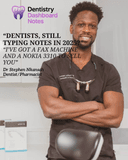
About Dr Stephen Nkansah
UK-registered dentist (GDC) and founder of Dentistry Dashboard. Built the platform after experiencing first-hand the documentation burden of UK dental practice — the AI Notes, voice perio charting, and bundled clinical workspace are the tools he wished he’d had as an associate.
Read the founder story →Related Articles
We're Live in America: HIPAA Compliant AI Dental Notes for US Dentists
Dentistry Dashboard is now available in the United States with full HIPAA compliance. Learn how our isolated US infrastructure keeps your patient data secure.
Read more →AI Dental Scribe: Hands-Free Clinical Documentation for UK Dentists
Discover how AI dental scribe technology is revolutionising UK dental practices. Voice-to-text notes, perio charting, and more—all hands-free.
Read more →A Guide to Voice Note Software for Your Dental Practice
A practical guide to implementing voice note software in your dental surgery. From microphones to patient communication tips.
Read more →